35mm grain is fine and cinematic, 16mm grain is coarser and more visible, and 8mm grain is heavy and nostalgic. The difference comes from the size of the film frame: the same grain particles are spread over a much smaller area on 16mm and 8mm, so when the image is enlarged to fill a screen, the grain looks bigger. Choosing a gauge is really choosing how much texture, and which era, you want your footage to suggest.
Why smaller film shows bigger grain
Film grain comes from the light-sensitive silver halide crystals in the emulsion. A 35mm motion picture frame is roughly 22 x 16 mm, a 16mm frame about 10 x 7.5 mm, and a Super 8 frame about 5.8 x 4 mm. Project all three onto the same screen and the smaller frames are magnified far more, so their grain, dust and imperfections become much more visible. Film speed matters too: fast stocks (for example 500 ISO) have larger crystals and more grain than slow stocks, at any gauge.
35mm grain: the feature film look
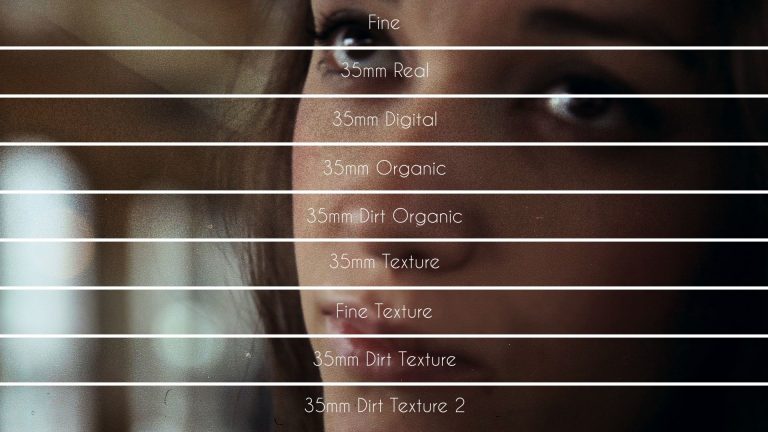
35mm is the standard gauge of theatrical cinema. Its grain is fine and evenly spread, visible mostly in shadows, skies and flat areas, and it gives digital footage a subtle organic texture without drawing attention to itself. Use it for narrative work, commercials, music videos and anything that should feel “cinematic” rather than “vintage”. Grainzilla’s 4K Film Grain Pack is built around real 35mm scans, from fine grain to dirt textures.
16mm grain: documentary, indie and music video
16mm has a coarser, livelier grain and slightly softer detail. It is associated with documentaries, indie features, TV of the 1970s to 1990s, and music videos that want an analog, handheld feel. Recent features shot on 16mm, like TIFF award winner Angh, show how expressive the texture can be. For a 16mm look on HD timelines, the 1080p Film Grain Pack includes a 16mm digital grain.
8mm and Super 8 grain: home movies and memories
8mm and Super 8 grain is heavy, shifting and imperfect, usually together with dust, scratches, gate weave, flicker and rounded frame edges. It instantly reads as memory, childhood or archival footage. To build a convincing Super 8 look, combine 8mm grain with the 8mm frame, flicker and dirt from the Vintage Film FX Pack; the 1080p pack also includes a real 8mm dirt film grain scan.
Quick comparison
| Gauge | Grain | Feels like | Use it for |
|---|---|---|---|
| 35mm | Fine, even | Feature film, premium | Narrative, ads, music videos, weddings |
| 16mm | Medium, visible | Documentary, indie, retro TV | Docs, music videos, flashbacks |
| 8mm / Super 8 | Heavy, irregular | Home movie, memory, archive | Flashbacks, nostalgia, horror, social |
How to apply any gauge
Place the grain overlay above your footage, set the blend mode to Overlay or Soft Light, and lower the opacity. Coarser gauges usually need less opacity than you expect. Step-by-step instructions for each editor are in how to add film grain in Premiere Pro, DaVinci Resolve and Final Cut Pro, and you can start with the free film grain overlays.
FAQ
Which film grain looks most cinematic?
35mm. It is the gauge of most feature films, and its fine grain adds texture without looking vintage.
Is 16mm grain bigger than 35mm grain?
The crystals are similar, but the 16mm frame is much smaller, so it is enlarged more on screen and the grain looks bigger and more visible.
How do I make video look like Super 8?
Combine heavy 8mm grain with an 8mm frame overlay, light flicker, dust and scratches, a slightly lower frame rate feel, and a warm, faded grade.