Image: cover image from ComfyUI Wiki’s Fibo 2.0 article, via ComfyUI Wiki
Bria has released Fibo 2.0, an 8-billion-parameter image model that both generates and edits pictures from one set of weights. For editors and motion designers the headline features are multi-reference editing with up to four images, mask-based edits, and an open-weights release that is already in ComfyUI. The catch is in the license: the weights are non-commercial only.
What Fibo 2.0 Is
According to ComfyUI Wiki, Fibo 2.0 is “an 8B-parameter flow-matching model that generates and edits images with one set of weights.” It comes in two checkpoints. Fibo 2.0 Dev is the full base model, meant for fine-tuning and research, and takes 50 sampling steps. Fibo 2.0 Edit Turbo is a distilled version for fast editing in four steps, and it does not use negative prompts.
The family’s signature is structured prompting. Rather than a loose sentence, Fibo works from a JSON-style description with separate fields for lighting, composition, color, camera and depth of field. You can type a short prompt and let the model expand it into that structure, then edit the structure and reuse it. For anyone who thinks in shot terms, that is a more natural way to say “35mm, shallow focus, warm key from the left” than stuffing everything into one line.
The Editing Features That Matter
Three edit modes stand out:
- Instruction edits change one thing in plain words while keeping identity, layout, lighting and fine detail elsewhere.
- Masked edits regenerate only the area you mark.
- Multi-reference edits take up to four images together, useful for things like virtual try-on or placing a product into a scene.
For a thumbnail, a title card or a storyboard frame, the reference mode is the interesting one. You can feed it a character, a prop and a background and ask for them in one frame.
How It Ranks, and Where It Doesn’t
ComfyUI Wiki, citing the model card, reports an Artificial Analysis snapshot that puts Fibo 2.0 first among open-weights models on the image-editing arena, with an Elo of 1087, and second among open-weights models on text-to-image. AlphaSignal adds that it statistically ties Qwen-Image-2.1 for the top open-weights text-to-image position, and flags text rendering and layout tasks as weaker areas.
That last point matters if you make titles and posters. If your job is lettering, a model built around typography will serve you better. If your job is changing one element in a frame without wrecking the rest, Fibo’s strengths line up better.
Running It and What It Costs
ComfyUI Wiki says native support landed in ComfyUI core a few days after the weights, with nodes for both checkpoints and for the structured prompts. The Comfy-Org repackage lists bf16 and int8 files for the diffusion models, plus a Qwen3-VL 4B text encoder and the FLUX.2 VAE, with the folder layout spelled out.
Now the license. The weights are published under CC BY-NC 4.0, which means non-commercial use only. The Comfy-Org repackage’s license note says commercial use requires a separate agreement with Bria. If you are making client work, ads or monetized content, running the open weights yourself does not cover you. AlphaSignal reports Bria’s hosted API at $32 per 1,000 images, about three cents each, which is the route for paid jobs, though check Bria’s pricing page before budgeting.
Where It Fits in a Video Workflow
Think stills first: a corrected plate, a concept frame, a thumbnail variant, a look reference to hand to a colorist. Fibo’s careful handling of unchanged regions makes it attractive for retouching a hero frame, such as removing a prop or swapping a wardrobe color, before you animate it in a video model.
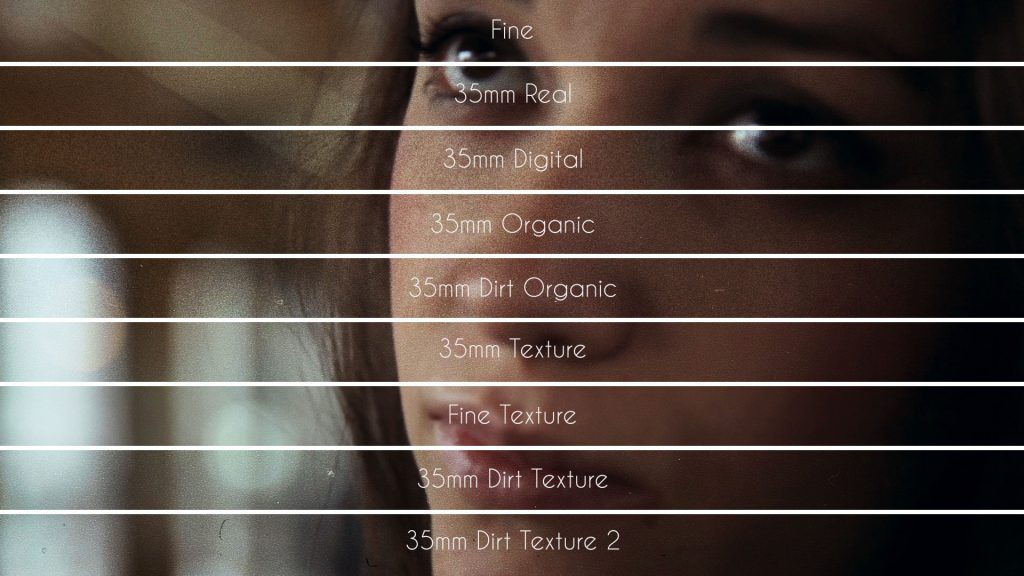
Generated stills usually come out clean, and that is a problem when they sit next to camera footage. Once the image is in your timeline, a layer of scanned grain, like the overlays on Grainzilla’s free film grain page, ties the AI frame to the rest of the cut.
The Takeaway
Fibo 2.0 is a strong open editing model with an honest catch. Use it freely for tests, mood boards and personal work, and budget for the license or the API before it touches a client invoice.
Sources: ComfyUI Wiki, Fibo 2.0: Bria’s 8B open-weights model edits and generates images; AlphaSignal, Bria’s FIBO 2.0 Matches Qwen on Open-Weights Image Benchmarks at Half the Price; Comfy-Org/Fibo-2.0, Hugging Face.