Image: ArtCraft, via getartcraft.com
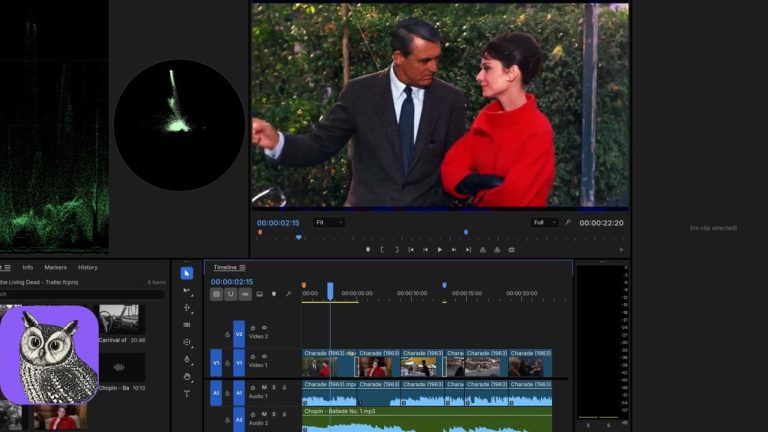
Filmcraft is a free, open-source video editor, written in Rust, that copies Adobe Premiere Pro’s workflow without using any Adobe code. It comes from the ArtCraft team, which has also released free clones of Photoshop and Lightroom, and the whole set was built with Claude. It is alpha software, and its own README says so. But what is already in it, and how fast it arrived, makes it worth a look from any editor.
What Filmcraft Does
According to the Filmcraft repository on GitHub, it has a multi-track timeline with source and program monitors and bins, three-point editing, ripple, roll, slip and slide trims, and unlimited undo with crash recovery. There is a Lumetri-style color panel with curves, wheels and HSL secondary keying, plus waveform and vectorscope monitors. The listed effects run past 93 across 16 categories, and the audio side has loudness metering, EQ, dynamics, reverb and denoise.
The format list is what a working editor will check first. The README lists H.264, HEVC, ProRes, VP9, AV1 and DNxHD/DNxHR support, MP4, MOV and MXF containers, and export to ProRes 422 HQ as well as H.264. For moving projects around it lists Final Cut Pro 7 XML, FCPXML, OpenTimelineIO, CMX 3600 EDL and AAF. It runs on macOS, Windows and Linux, and in a browser. The license is MIT or Apache-2.0.
The Honest Status
The README is blunt. It describes Filmcraft as alpha, and puts it at about 86 percent of Premiere Pro’s feature breadth but only about 56 percent ready for production work. There is no .prproj import, so you would bring a Premiere project over through XML, AAF or OTIO. There is no plugin hosting for VST3, AU or OpenFX, no AV1 export yet, and the color and key effects run on the CPU rather than the GPU. Treat it as something to try on a throwaway project.
The sister app has drawn a similar verdict. In its review of PhotoCraft, OMG! Ubuntu’s Joey Sneddon wrote that the UI and UX come close but the output differs from Adobe’s, summing it up as “Same menus, same shortcuts… different results.” For a colorist, that last part is the catch: a familiar panel is not the same as a familiar image.
Why Editors Should Care Anyway
The first reason is the agent angle. Filmcraft says “every menu item, button, slider and drag” is a command, with more than 650 engine commands you can drive through a JSON channel or a Model Context Protocol server. That means an AI assistant such as Claude can place clips, trim and render on a timeline. For rough cuts, batch conforms and repetitive assembly, that is the interesting part, and it is a real working example of the “editor you drive with Claude” idea.
The second is speed. Phoronix’s Michael Larabel described the ArtCraft apps as “open-source, clean-room reimplementation” projects made with AI agents, and called them a demonstrator of what AI can do and of “potentially pressing legal challenges.” That legal question is open. A clean-room claim is the developers’ own description, and I found no independent legal review of it. If you plan to use these tools on client work, watch how that plays out.
Who Should Try It
Try it if you cut a lot of simple material, want an editor you can script, or want to see what AI-driven development looks like in a tool you already understand. Skip it for a deadline project. If you are on Premiere, Resolve or Final Cut today, nothing here forces a switch. If you try it, finish your export the same way you would anywhere else: grade, sound, and a pass of real film grain to give clean digital footage some texture. Grainzilla’s free film grain downloads are ProRes 422, a codec Filmcraft lists as supported, which keeps the fine detail grain is made of.
A free editor with a Premiere layout is a novelty. One that an assistant can operate from the outside is a preview of how rough cuts may get made.
Sources: ArtCraft, Filmcraft repository, GitHub; ArtCraft, PhotoCraft repository, GitHub; Michael Larabel, Phoronix, “AI Makes Open-Source, Clean Room Implementations Of Adobe Photoshop & Premier In Rust” (Oct. 7, 2026); Joey Sneddon, OMG! Ubuntu, on PhotoCraft (Oct. 2026); ArtCraft, Filmcraft app page.