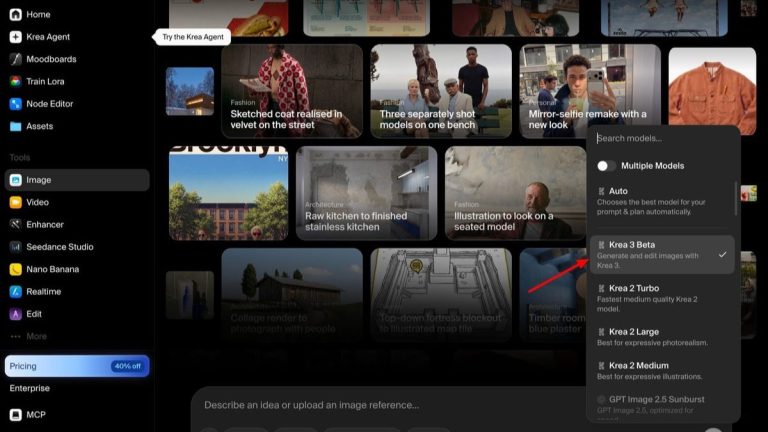
Image: Krea 3 Beta in the Krea app, via TestingCatalog
Krea has launched Krea 3 in beta, an image model built around editing: give it a photo and up to six reference images, draw a box where you want a change, and it returns a 2K result in under eight seconds, according to TestingCatalog. It costs $0.03 per image at 1K and $0.06 at 2K.
What Krea 3 Does
The pitch is control. Krea 3 edits a selected region and leaves the rest of the frame alone, and bounding boxes let you decide where a new element goes. Comfy.org’s Krea 3 page describes it as modifying “only what you specify while keeping the rest of your original image 100% untouched.”
References can include people, products, backgrounds and style images, so you can swap an outfit, a setting or the lighting while keeping a face consistent. Output is native 2K with 4K available for print and campaigns, and Kompozy calls it the first editing model that can be fine-tuned with LoRAs for a specific product, character or style. The ComfyUI page also lists exact hex-color matching and 251 launch presets.
Price and Access
You can use it on krea.ai, through Krea’s API, or through partners including fal, Together AI, OpenRouter, Replicate, Baseten, Hedra and Nous Research. Comfy Cloud offers it pay-as-you-go. Krea lists Pixelcut, the small-business photo-editing app, and Doodles among early users.
Beta Limits to Know About
The launch is labeled beta. In the Krea app the model picker lists it as “Krea 3 Beta” with the description “Generate and edit images with Krea 3,” next to Krea 2 Turbo, Krea 2 Large, Krea 2 Medium and GPT Image 2.5, and the prompt bar carries Lora and Style transfer buttons. Kompozy points out that Krea 3 is about editing and does not handle publishing, so finished images still have to go into other tools for captions, formatting and scheduling.
Reference limits also vary by where you use it. Kompozy reports up to six references per edit, and four on fal’s endpoint, so check the route you plan to use before designing a workflow around six.
Marketing Claims Versus Evidence
In its launch post on X, Krea wrote: “end-to-end 2k edits in under 8s. matches Nano Banana Pro or GPT Image 2.5 quality.” That comparison is Krea’s. Kompozy notes that independent testing is still thin at launch and recommends checking before you build a workflow on it. I would run your own hardest edit, the one with hands, text or a face you care about, before trusting a launch claim.
Where Editors Might Use It
The obvious jobs are the ones that sit around a video rather than inside it: thumbnails, title-card backgrounds, key art and storyboard frames. Box-based placement is useful there because you often need to leave a clean area for type or protect the subject while you change everything else. Consistent characters across a handful of frames is the other draw, and it is where editing models have usually slipped.
Stills pulled into a timeline can look flatter than the footage around them. A real film scan laid over them helps; Grainzilla’s free film grain downloads are a quick way to test that.
Krea 3 is a fast, cheap way to change one thing in a frame without changing the other ninety percent, and that restraint is what separates an edit from a regeneration.
Sources: TestingCatalog, Kompozy, Comfy.org, Krea (@krea_ai), as quoted by TestingCatalog.